Reusable PDF templates
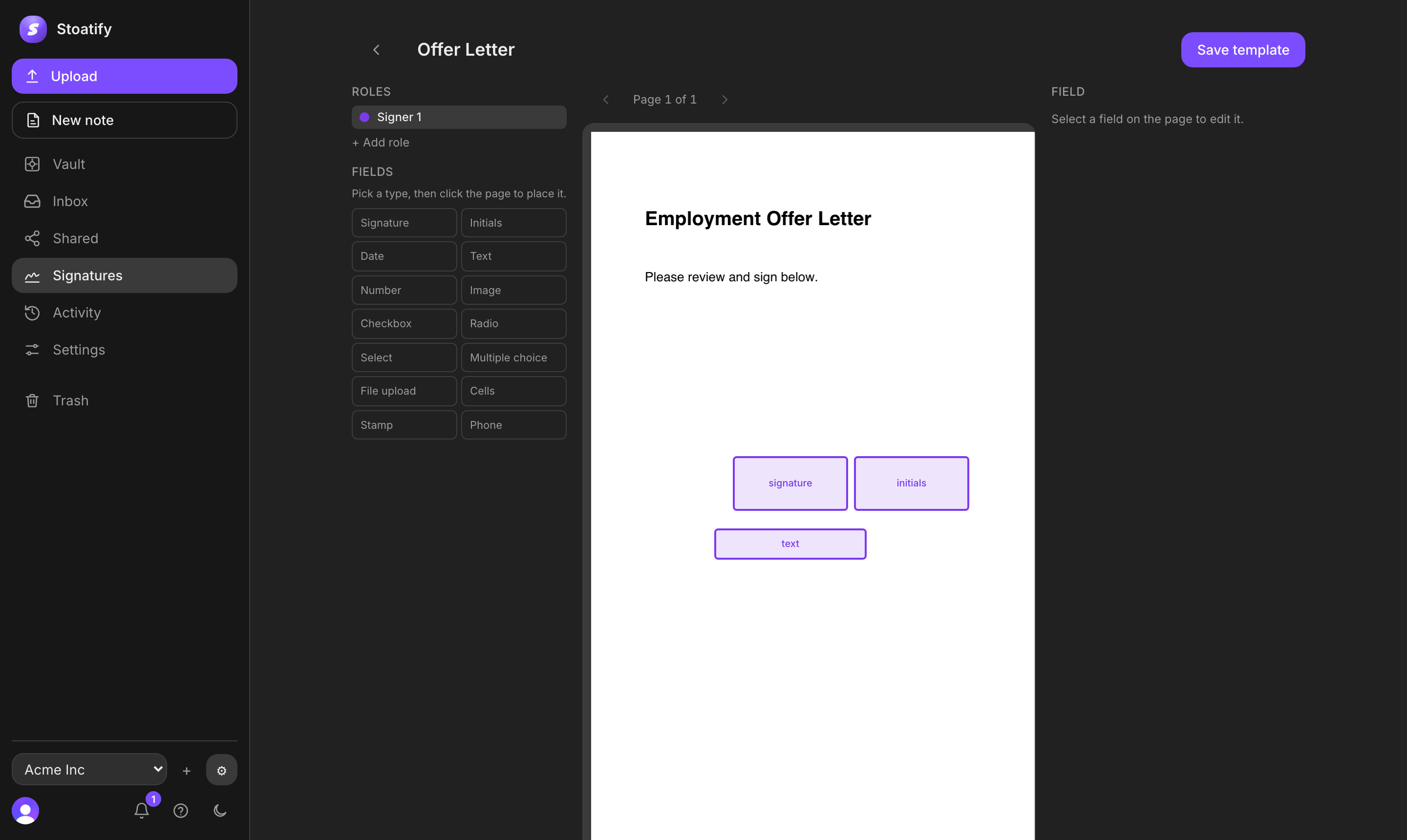
Place signatures, initials, dates, text, checkboxes, selections, attachments, stamps, and other fields once, then send the template again whenever you need it.
E-signatures inside your secure document platform
Turn any PDF into a reusable template, route it to one signer or many, and track every request through completion. Signers need no account, and the sealed PDF and completion certificate return to your Vault.
Built for everyday agreements
Laws such as the US E-SIGN Act, state UETA enactments, Ontario's Electronic Commerce Act, and EU eIDAS generally prevent a signature from being rejected only because it is electronic. Stoatify records evidence of the signer's intent, the signing channel, the completed terms, and the document's integrity.
Contracts, NDAs, service agreements, approvals, and other routine records can be signed electronically. The agreement itself still needs valid terms, authority, and any formalities required by its jurisdiction.
Complete signing workflow
Stoatify handles the practical work around a signature, not just the mark on the page. Build once, send from the same platform as your documents, follow progress, and keep the final evidence with the record.
Place signatures, initials, dates, text, checkboxes, selections, attachments, stamps, and other fields once, then send the template again whenever you need it.
Send to any number of people in parallel, or set a sequential route so each signer receives access at the right point in the agreement.
A signer opens the private link from any modern browser, completes only the fields assigned to them, and draws, types, or uploads a signature.
See sent, viewed, signed, completed, and voided status, then receive the sealed PDF and completion certificate in the Vault.
Compare your options
Dedicated signing products and office suites are strong choices for their own jobs. Stoatify is the better fit when you want e-signatures, document organization, search, secure sharing, versioning, and activity history in one platform.
Designed around the legal evidence
Electronic-signature laws focus on the same fundamentals as paper: intent, attribution, association with the agreed terms, and a record that can be retained and reproduced.
Did the signer choose electronic signing and mean to sign?
The signer opens an addressed request, reviews the PDF, supplies every required value, and selects “Sign and complete.” The completed record preserves that deliberate signing act.
What connects the act to the claimed person?
Stoatify connects the request to the recipient name and email, a unique private link, opened and signed timestamps, IP address, and browser details.
Can the signature be tied to these exact terms?
Fields are rendered onto the final PDF before the organization applies its digital seal. The embedded signature covers the PDF byte ranges, so a later change is detectable by cryptographic verification.
Can the record be reproduced later?
The completed PDF and its completion certificate are saved in the sender's Vault, where the original digital files can be downloaded, retained, and verified later.
Signing lifecycle
Each stage has a clear job: preserve the terms, control access, record the signing act, capture context, and make later changes to the completed PDF detectable.
Turn a PDF into a reusable template with 14 field types. Field coordinates, signer roles, and signing order are fixed for each submission.
PDF snapshot + fractional field coordinatesStoatify creates 32 random bytes for each signer. Only a SHA-256 hash is stored; the raw secret stays in the link sent to that signer.
256-bit random bearer capabilityAt first open, Stoatify records the time, IP address, and browser user agent. Sequential requests remain blocked until the earlier signer finishes.
openedAt + IP + user agentThe signer completes every required field and selects Sign and complete. The server stores the values and records the completion time.
required fields + signedAtAfter every signer finishes, the values are flattened onto the PDF and the complete byte range is signed with the organization's X.509 key.
SHA-256 + RSA + CMS/PKCS #7The signed PDF returns to the Vault. A separate completion certificate lists each signer, email, signed time, IP address, and user agent.
sealed PDF + completion certificateTechnical integrity
Stoatify flattens the submitted values onto the PDF, signs its byte ranges, and stores the sealed file with a readable certificate that summarizes who signed, when, and through which session.
Inputs
Signature images, initials, dates, text, selections, and other assigned fields.
Seal
The organization key signs a digest. The certificate and time evidence travel inside the PDF signature.
Output A
A verifier recomputes the digest. A later byte change causes integrity validation to fail.
Evidence summary
Names, emails, signed times, IP addresses, user agents, and the overall completion time, stored alongside the sealed PDF in the Vault.
Signer identity
Every request is addressed to a named recipient at their email address, with a private signer link and a recorded signing session. Together, these facts create useful attribution evidence for routine agreements without overstating what any individual signal proves.
Stoatify's standard flow does not perform a government-ID and liveness check or issue an eIDAS qualified electronic signature. For high-value, regulated, notarized, or identity-sensitive agreements, pair the signing record with the stronger identity, authority, witness, or qualified signature process the transaction requires.
If a dispute reaches court
The original PDF, its embedded signature, the completion certificate, and the signing metadata give your legal team concrete artifacts to verify, preserve, and connect to the surrounding transaction.
Keep the completed PDF, certificate, invitation email, related agreement, and the surrounding business records. Do not print and scan the PDF, because that discards its embedded signature.
Run the original PDF through Stoatify's verifier or a capable PDF signature validator. Record the signature count, integrity result, certificate subject, and trusted timestamp result.
A witness or qualified person may explain how the records were created and kept. In US federal court, Rules 901 and 902 describe system evidence and certifications used to authenticate electronic records.
Connect the sealed PDF and certificate to the invitation, negotiations, approvals, identity checks, authority records, and later performance. The whole transaction gives the signing evidence its context.
Stoatify preserves product evidence, while courts decide authority, capacity, admissibility, weight, and enforceability from the complete record and the law that applies. A completion certificate supports that record, but it does not replace surrounding business evidence or document-specific formalities.
Laws and technical standards
Legal requirements vary by document, parties, location, and governing law. These links are a starting point for counsel and technical reviewers, not a substitute for jurisdiction-specific advice.
Use Stoatify for a complete, tamper-evident signing workflow, then match additional identity and legal formalities to the risk and document type.
Capture, organize, find, share, and sign documents without moving work between tools.
No credit card required